How to Stay Connected Anywhere in the World (No Roaming Fees)
I set my eSIM up at home the night before I flew, while I still had my own WiFi. Then I landed in Washington, D.C. for an eight-day trip, turned my phone off airplane mode at the gate, switched on my Holafly data line, and it just… worked. No hunting for airport WiFi, no SIM kiosk line. I needed it immediately, too — my ride was waiting on the other side of security, and the only way to actually find him was to text him the second I landed.
That’s the whole pitch for a travel eSIM in one sentence: it works before you even land. Here’s exactly what I used, how I set it up, and whether I’d tell you to get the same thing.

Affiliate disclosure: This post contains affiliate links. If you book or buy something through these links, I may earn a small commission at no extra cost to you. I only recommend things I genuinely use or believe in. Learn more.
Table of Contents
Lili’s pick for staying connected abroad
The eSIM I actually use: Holafly. This is the one I’d get — install it before you leave home, and it’s already active the moment you land.
Use code MILESANDFLAVORS for 5% off a travel eSIM, or 10% off your first 12 months on a Holafly Plan. It’s a reusable code, so save it for your next trip too.
What Is an eSIM, and Why It Beats Roaming or a Local SIM Card
An eSIM is a digital SIM card — there’s no physical chip to swap in and out. You install it as a small profile on your phone, and it runs alongside your regular home SIM, so your real phone number keeps working for calls and texts while the eSIM handles data. No tiny SIM tray tool, no losing your original SIM card in a hotel room somewhere.
Compared to the two usual alternatives, it’s a clear upgrade for how I travel:
- Roaming through your home carrier — works instantly, but the per-day or per-MB fees add up fast, and I’ve had carriers cap speeds to nearly unusable after a few hundred MB.
- A physical local SIM card — cheaper than roaming, but means finding a kiosk after landing, sometimes standing in a line, and being without data for that whole stretch — exactly the window when you need a map or a rideshare app the most.
An eSIM skips both problems: you set it up before you leave, and it’s simply on when you land.
Why I Use Holafly Specifically
There are several eSIM brands out there, and I’ve tried more than one over the years. I switched to Holafly because the setup has been the simplest of any of them, and — the part that actually matters on a trip — the connection has held up. On this Washington trip specifically, I never had a moment where it dropped out or slowed to a crawl, which is the actual bar I care about, not just “does it technically connect.”
How I Set Mine Up Before Leaving Home
This is the part people overthink, and Holafly is actually specific about how to do it right. I did the whole thing from my couch, the night before I left:
- Bought the eSIM through Holafly for the destination and length of trip.
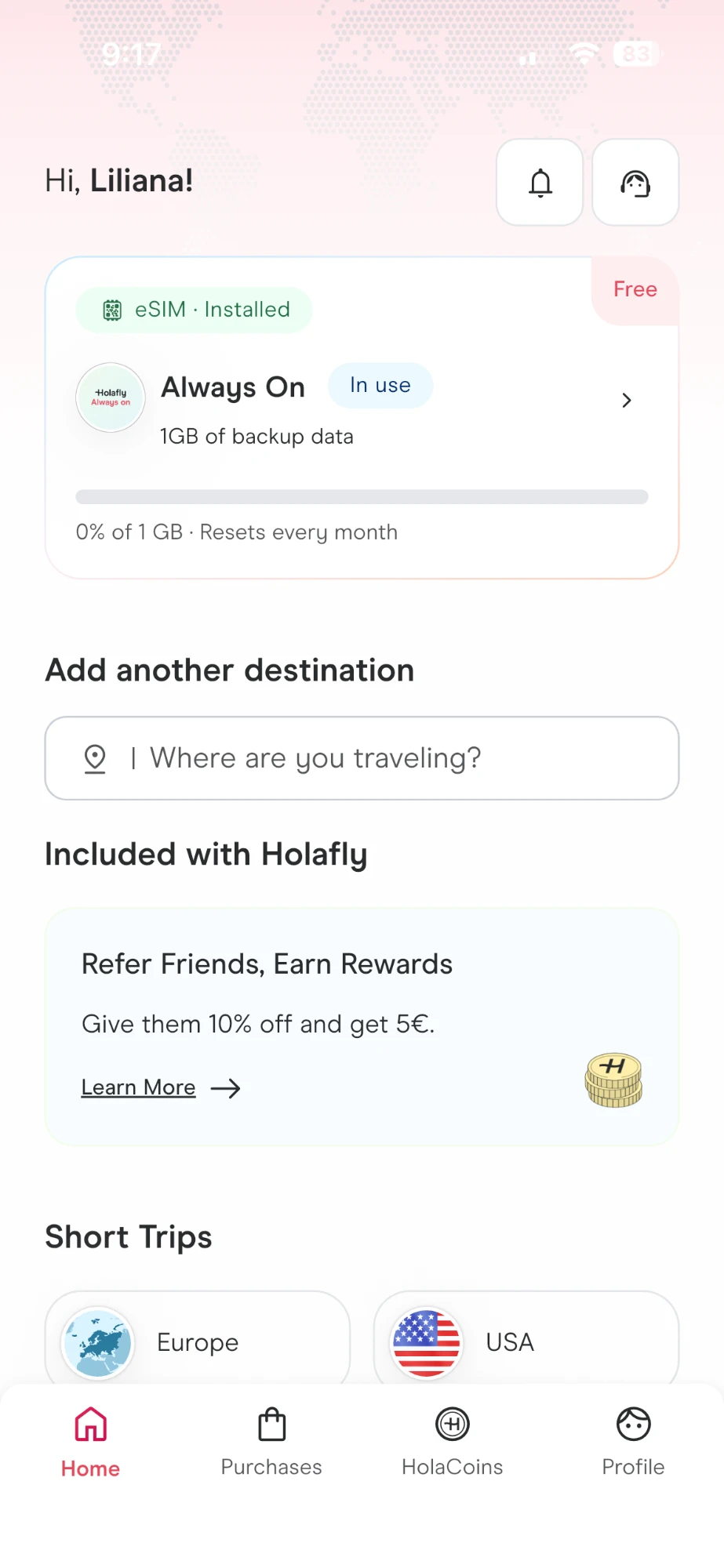
- Installed the eSIM profile right there at home, on my own stable WiFi — either from the QR code Holafly emails you immediately, or with one button through the Holafly app, which is the easier route.
- Left it installed but inactive. You want a stable connection for the install itself, and you want your data days to start when you actually land, not the moment you install it.
- The moment my flight touched down, I switched off airplane mode, went into my phone’s mobile data settings, selected the Holafly eSIM as my data line, and turned data roaming on for it. That last step matters — the eSIM only starts working once data roaming is switched on for it specifically, not just when you turn off airplane mode.
That’s it. No app-store scrambling at the gate, no scanning a QR code with spotty airport WiFi while people wait to get past you in the aisle.
What It Was Actually Like in Washington, D.C.
I was in D.C. for eight days, and I needed my phone to work the second I landed — my ride was already waiting for me on the other side of security, and texting him was the only way we were actually going to find each other in the terminal. I switched off airplane mode and turned on data roaming for the Holafly line right at the gate, and by the time I’d walked to arrivals, I had full signal and was already messaging him.
From there, it genuinely felt like using my phone at home. Maps, messaging, emails, all of it, for the full eight days, without a single dead spot that I’d attribute to the eSIM rather than just normal cell coverage.


Holafly vs. Roaming vs. an Airport SIM Kiosk
| Holafly eSIM | Home carrier roaming | Airport SIM kiosk | |
|---|---|---|---|
| Set up before you fly | Yes | Yes (but often just a toggle you forget to turn off) | No — only after landing |
| Working the moment you land | Yes | Yes | No — requires finding the kiosk first |
| Keeps your real phone number active | Yes | Yes | Only if you keep your original SIM in a second slot |
| Typical cost for a week | Fixed price, known before you leave | Often the least predictable — per-day or per-MB fees | Usually cheap, but variable by country and vendor |
How Much It Costs (and the Code I Use)
Holafly’s pricing is straightforward: you pick your destination and how many days of data you need, and you see the price up front — no surprise per-MB charges once you land. You can check current plans and pricing for your destination here.
Use the code MILESANDFLAVORS at checkout for 5% off a travel eSIM, or 10% off your first 12 months if you go with a Holafly Plan instead. It’s not a one-time code — keep it saved for your next trip.
A Few Things I’d Tell a Friend Before Their First eSIM
- Install it the night before you fly, not at the airport. You want stable home WiFi for the install, not a crowded terminal network.
- Leave it inactive until you land so your data days start exactly when you need them, not while you’re still at home.
- Turn on data roaming for the eSIM specifically once you land. Turning off airplane mode isn’t enough on its own — go into your data settings and select the Holafly line, then switch data roaming on for it.
- Check your phone supports eSIM first. Most phones from the last several years do, but it’s a 30-second check worth doing before you buy.
- Keep your original SIM in the phone. The eSIM handles data — your normal SIM still handles calls and texts on your real number.
Travel eSIM FAQ
Do eSIMs work on any phone?
Most phones released in the last several years support eSIM, but not all — check your specific model before buying. It only takes a minute in your phone’s settings under “Add eSIM” or similar wording.
Will I lose my real phone number?
No. Your regular SIM stays active for calls and texts on your normal number. The eSIM only adds a second data line — it doesn’t replace anything.
What happens if I run out of data?
You can top up or buy an additional plan for your remaining days directly through the Holafly app or site — you’re not stuck without data for the rest of the trip.
Final Thoughts
I’ve gotten to the point where setting up an eSIM before a trip feels as automatic as packing a charger. It’s a five-minute task at home that saves me from the one thing that actually stresses me out at a new airport: needing to reach someone and not having a working phone to do it with. That’s really the whole case for it — not a huge dramatic upgrade, just one less thing that can go wrong the moment you land.